The site is fast in your office. It is fast on your phone in the car park. And a customer in Sharjah, or a supplier in Riyadh, or your own colleague on a hotel connection tells you it takes forever, and nobody can say whether that is the hosting or the way the site was built.
Those are two different problems with two different bills. Changing host costs a day and a few hundred dirhams a year. Rebuilding a heavy front end costs weeks. Most companies guess, and about half of them spend the money on the wrong half. This separates them in about twenty minutes, using free tools, without being technical.
The two halves, stated once
Every page load has a waiting part and a working part.
The waiting part is everything before the first byte of your page arrives: the domain lookup, the connection, the encryption handshake, and your server thinking. That is distance, hosting and server work. MDN describes the measure for it precisely: time to first byte includes the DNS lookup and the connection and encryption handshakes, and it is readable from the browser itself.
The working part is everything after that: downloading images, fonts, scripts and stylesheets, then assembling and running them. That is the build, and it is the same wherever the visitor is standing.
Almost every argument about site speed is people talking about one half while measuring the other.
The twenty-minute measurement
Open your site in Chrome, open the developer tools, go to the network panel, tick disable cache, and reload. The first row is your own page. Read two numbers from it: the time to first byte, and the total load.
Now the thresholds. Google publishes what good looks like for the visitor-facing measures: largest contentful paint under 2.5 seconds, interaction to next paint under 200 milliseconds, and cumulative layout shift under 0.1, at the seventy-fifth percentile of loads. For the waiting half, treat anything above about 800 milliseconds of time to first byte as a hosting question rather than a build question.
Then do it twice more: once on mobile data rather than office wifi, and once with a connection routed through somewhere else if you can, because the whole complaint is about people who are not where you are.
Why your own test is the least reliable one
Your browser has your site cached, your DNS is warm, and your office connection is probably better than your customers’. That is not a small distortion. It is why sites that feel fine to the people who own them are slow to everyone else.
The way out of your own bias is field data — measurements from actual visitors rather than from your machine. Google collects it: the Chrome User Experience Report is field data from real Chrome users, and it informs the page experience signal in Search. If your site has enough traffic to appear in it, that is the honest answer about what your visitors experience, and it costs nothing to look at.
Where there is not enough traffic, run the test from three real devices on three real connections, and write the numbers down. Three data points from outside your office beat any number of reloads inside it.
What a nearer server actually buys
If the waiting half is your problem, distance is usually why. And there are genuinely close options now: Microsoft’s own region list shows UAE North in Dubai with availability zones, and UAE Central in Abu Dhabi as a restricted-access region, while Amazon documents me-central-1, Middle East UAE, with three availability zones, as an opt-in region.
Two honest qualifications before anyone signs anything. Most small WordPress sites are not hosted directly on either of those; they are on a hosting company that may or may not sit in one. Ask your host which city your server is in and get the answer in writing, because the answer is often not the country on the website.
And a content delivery network moves the static parts closer without moving your server at all, which is cheaper and often enough. It does not speed up the part where your server thinks. So a slow first byte on an uncached page is still a hosting or a database problem after you add one.
What fixes the working half
If the first byte arrives quickly and the page is still slow to become usable, the weight is the problem, and no host will fix it.
In WordPress terms the order is boring and reliable. Serve cached pages, because the platform’s own guidance is that caching plugins serve posts as static files and can improve performance several hundred times over for fairly static pages. Then images: correctly sized, modern formats, and never a two-megabyte photograph scaled down in the browser. Then fonts, which are the most common single cause of a Gulf site feeling slow, especially where an Arabic and a Latin family are both loaded in several weights. Then scripts, and specifically the ones nobody remembers adding.
Fonts deserve a sentence of their own, because they are the one item on that list that is invisible in a screenshot. A bilingual site typically loads a Latin family and an Arabic family, and if each arrives in four weights that is eight files before a single word is readable. Two weights of each is almost always enough, and the page becomes usable noticeably sooner on a slow connection. It is the cheapest improvement on this list and the one most often missed.
The uncomfortable finding, when this is done properly, is usually that the site was built heavy and the hosting was fine. That is a harder conversation and a more expensive fix, which is exactly why it is worth measuring before deciding. It is also why the answer to a speed complaint should never be a hosting upgrade bought the same afternoon.
The decision, in one line each
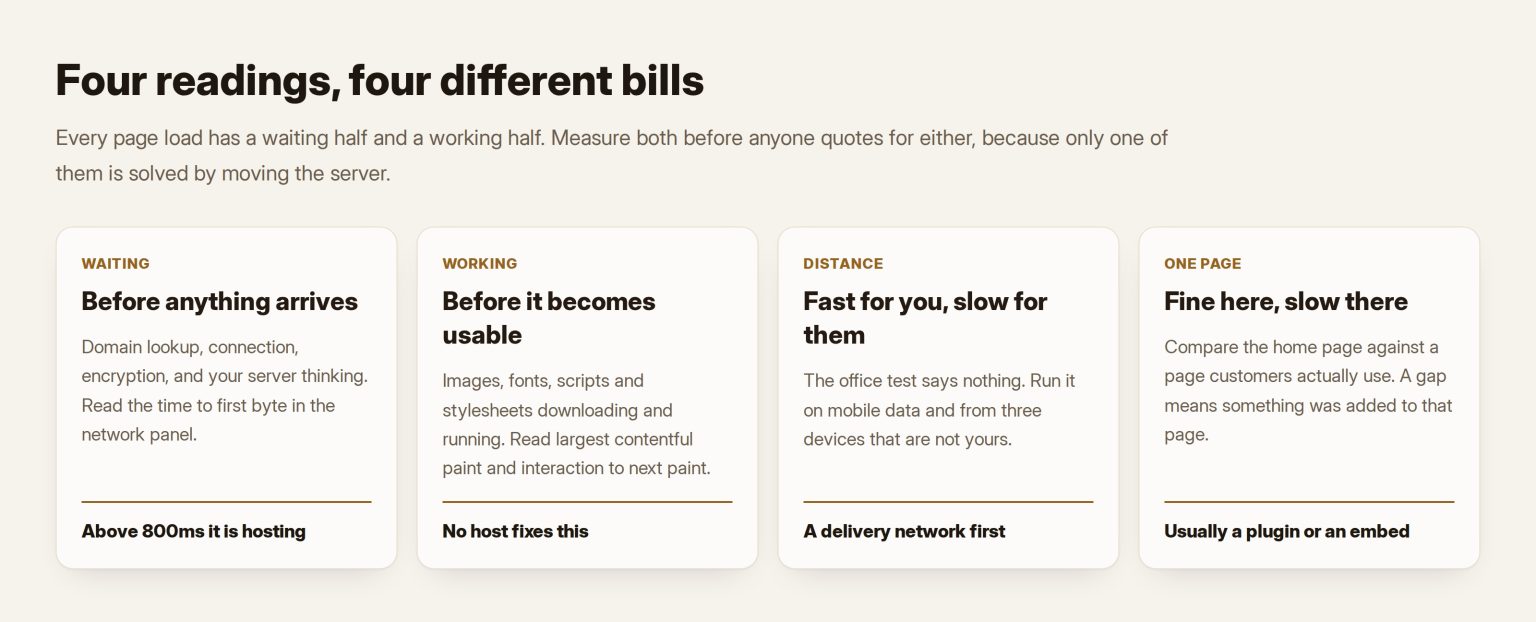
Four readings, four answers, and you will have all four numbers by the end of the exercise.
Slow first byte everywhere, including for you: hosting or the server, and it is the cheap fix. Fast first byte, slow to become usable: the build, and no host will save you. Fast for you, slow for everyone else: distance, so a content delivery network first, a region second. Fast on a fresh page, slow on the ones people actually use: something specific on those pages, usually a plugin or an embedded third party.
Whichever it is, the number belongs in writing before the money is spent, because this is one of the technology decisions a company ends up paying for twice when it is settled by opinion. And if you have inherited the site and cannot get straight answers about where it lives or what it runs on, that is the first section of the technical due diligence I run rather than a speed problem at all. Where the site is the business rather than a brochure, this belongs in the WordPress work as a standing measurement rather than a one-off panic, and it is part of what building or rebuilding a site properly is supposed to settle at the start.
A build that passes Core Web Vitals in the Gulf before hosting is blamed is what my company delivers: website design and development at Tothiq.
Frequently asked questions
Our host says the server is in the region. Should I believe them?
Ask which city, and then verify rather than argue. The time to first byte from a device in the UAE tells you most of what you need: a server genuinely nearby will usually answer in a couple of hundred milliseconds on an uncached page, and one on another continent rarely does. If the number is high and the host insists the location is local, the delay is inside the server rather than on the wire, which is still their problem.
Will a content delivery network fix this on its own?
It fixes distance for static files, which is often the largest single improvement available and is cheap. It does not fix a slow database, a heavy theme, or a page that runs a lot of code before it can answer. Add one early because it is inexpensive and rarely harmful, then measure again. If the numbers barely move, you have learned that distance was not your constraint, which is worth knowing before a migration.
How much does moving hosting actually cost?
For an ordinary WordPress site, the move itself is a day of work plus the new hosting, and most of the risk is in email and DNS rather than the site. The real cost is the things nobody wrote down: which email addresses live where, who holds the domain, what else points at that server. If those answers are not documented, the migration is a week rather than a day, and that is a records problem rather than a technical one.
Does site speed affect our search ranking?
It is one input among many, and it is not the one that decides whether you rank for something you have never written about. Treat speed as a conversion and reputation issue first: people leave slow pages, and that is measurable in your own analytics long before any ranking effect. Fix it because customers are waiting, and take the search benefit as a secondary return rather than the reason.
Our developer says the site is fine and the problem is the customer’s internet.
Sometimes true, and easy to settle rather than debate. Field data from real visitors, or three tests from three ordinary connections, will show whether the slowness is general or specific to one person. What that answer never justifies is doing nothing: a page built to survive a poor connection is faster for everyone, and the largest single lever is usually the weight of images and fonts, which is entirely inside your control.