Most UAE company sites that run in Arabic and English are one WordPress installation with a translation plugin on top. The choice of plugin and URL pattern takes an afternoon. What happens to the site over the following two years is decided by that afternoon, and most of what goes wrong only shows up after launch, when nobody is looking at the Arabic side.
I run two bilingual WordPress sites this way myself, publishing in both languages three times a week, so what follows is less a comparison of features than a list of what actually breaks, and the decisions that prevent it.
Three ways a plugin can hold the second language
The plugins look similar from the admin menu. Underneath, they store the Arabic in different places, and that is the decision that matters.
The first kind makes each translation a separate post linked to its twin. Polylang works this way, and so does WPML. The Arabic page is a real page with its own title, slug, excerpt and SEO fields, written in Arabic rather than converted from the English. It is more work per page and it is the only model in which the Arabic can say something different when it should.
The second kind stores translations as strings and swaps them in as the page is served. TranslatePress describes itself as translating the entire page at once from the front end, including output from forms and page builders. That is fast to set up and genuinely convenient for small sites. The cost is that the Arabic is always a shadow of the English page, sentence by sentence, which is exactly the translated feel that Arabic-second sites always show.
The third kind runs each language as its own site in a WordPress network, connected by a plugin. It gives each language complete independence, and it doubles everything you maintain: themes, plugins, users, updates. I would only choose it when the two languages are run by different teams.
The URL pattern is the decision you cannot easily undo
Google’s guidance on sites in several languages lists the options: a separate domain, a subdomain, a subdirectory, or a URL parameter, which it does not recommend. For a company site, a subdirectory such as /ar/ is the right default. It keeps one domain, one hosting account and one certificate, and every link the English pages have earned helps the Arabic ones too.
Polylang’s URL settings offer all of these, plus the option of hiding the language code for the default language. Decide this once, before the first Arabic page exists. Changing it later means redirecting every Arabic URL on the site, and the Arabic slugs you have accumulated by then are the hardest part of that job.
Choose the slug language at the same time. Arabic slugs read naturally in a shared link and look like long strings of percent signs when copied into an email. Latin slugs on Arabic pages are tidy but say nothing to an Arabic reader. Either is defensible. Mixing them by whoever happened to create the page is not.
Everything that is not a post
The pages translate because somebody writes them. The parts of the site that nobody thinks of as content are where English survives on Arabic pages:
- menus, which in Polylang are assigned separately for each language;
- widget text, footer lines and the cookie notice;
- strings built into the theme, such as the tagline, button labels and “Read more”;
- form labels, error messages and the confirmation email the visitor receives;
- the SEO title and description of every page, held by the SEO plugin rather than the page itself;
- image alternative text, which is set once per image unless someone sets it again.
Polylang handles the registered ones through its strings translation screen. Strings written into the theme need its translation file instead. On one of my own sites the header tagline showed in English on every Arabic page for a month, because a newly written English phrase had no entry in the theme’s Arabic file. Nothing looked broken in the editor. It only showed on the live Arabic page.
Categories and tags have a language too
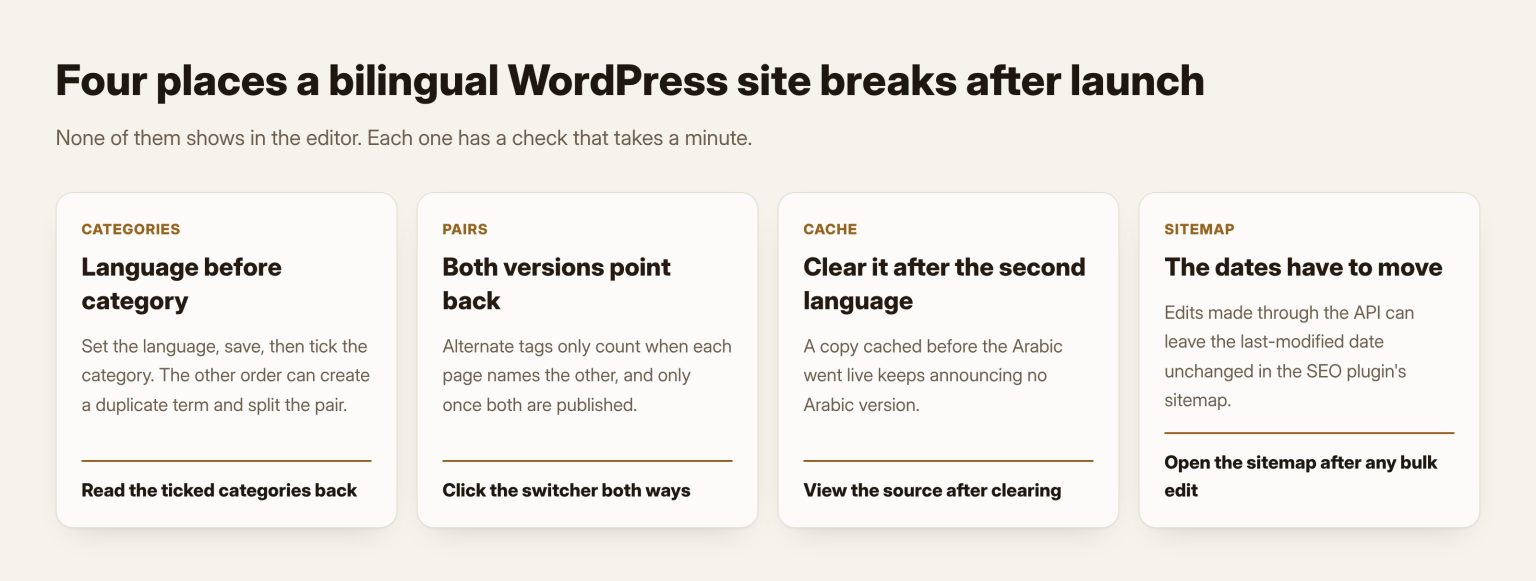
In a plugin that keeps separate posts, each category exists twice, once per language, linked as a pair. It is easy to break. If a post is still marked as English and someone ticks the Arabic category, the plugin can create a duplicate English category to make the assignment fit, and in doing so separate the real pair.
The fix is a habit: set the language of a new post first, save, and only then choose the category. After saving, read back which categories are actually ticked, because changing the language can quietly reassign one. It takes ten seconds per post and it saves an afternoon of repairing broken archives later.
The two versions have to point at each other
Search engines learn that two pages are the same content in different languages from alternate tags in the page head. Google’s guidance on localized versions is plain about the rule: if two pages do not both point to each other, the tags are ignored. The plugin writes these tags for you, but only for pairs it knows about, and only once both pages are published.
That last condition catches people who publish the English today and the Arabic tomorrow. For a day the English page announces no Arabic version, which is correct. If the site is cached, it can go on announcing that after the Arabic page is live, because the cached copy was made before. Clear the cache after the second language goes live, then view the source of both pages and look for the two alternate links.
Check pairs from both sides as well. A link set on one edit screen and not saved on the other leaves two pages that each think they are alone.
The language switcher in the header shows the same fault to visitors. When the plugin does not know a page’s twin, the switch sends the visitor to the Arabic home page instead of the page they were reading, and they start again or leave. Click the switcher on every service page once, in both directions, and within minutes you will know which pairs were never actually linked.
The sitemap may not notice your edits
On my own sites, edits made through the WordPress REST API, which many tools and integrations use, changed the page but left its last-modified date in the SEO plugin’s sitemap unchanged. Search engines read that date to decide what to recrawl. The cure was simple once found: saving any one post in the editor rebuilt the sitemap. The lesson is wider. After any bulk change, open the sitemap and confirm the dates moved, in both languages.
Check the Arabic where Arabic visitors see it
The preview link and the plain ?p= address do not always carry the language with them. On a Polylang site, opening an Arabic post by its numeric address can show the Arabic text inside the English layout, left to right, with an English page language. A correct page looks broken there. Always check an Arabic page at its real /ar/ address, on a phone, with the page source open for the language and direction attributes.
Speed belongs in the same check. A second language adds queries and strings to every request, and a site that was quick in English can be slow in Arabic. The hosting side of that problem is in why a WordPress site is slow in the Gulf.
Somebody has to own the Arabic after launch
The launch is the easy part, because everyone is looking. Six months later, a price changes on the English services page, a new team member is added to the About page, an opening hour moves for summer. Each change is made in English by whoever noticed it, and the Arabic page keeps the old version, sometimes for a year.
The rule that stops this is short: no English page is changed without its Arabic twin being changed in the same sitting, by the same person or by a named Arabic owner who is told the same day. Keep a simple log of what changed on which pair. When the two versions disagree on a price or a phone number, the visitor does not decide which one is wrong. They decide the company is careless.
What I would set up on day one
- A plugin that keeps separate, linked posts, with the language in a
/ar/subdirectory. - A written rule for slugs, and for which language is the default.
- Every menu, form, email and theme string translated before launch, checked on the live Arabic pages.
- A publishing order: language, save, category, save, link the pair, publish both, clear the cache.
- A monthly look at both language versions in Search Console, separately.
Which pages need an Arabic version at all is a separate decision, covered in what keeping an Arabic version costs. If you would rather have the site built bilingual from the first day, Tothiq AI Services and Solutions builds WordPress sites in Arabic and English with this setup as standard, and my own WordPress work in the UAE covers reviewing one that already exists.
Frequently asked questions
Is Polylang or WPML better for a UAE company site?
Both keep each translation as its own linked post, which is the model I recommend. Polylang’s free version is enough for most company sites. WPML suits sites that need its paid integrations. The URL pattern and the publishing habits matter more than the brand.
Can we use automatic translation and fix it later?
You can, but later rarely comes. Machine translation is a reasonable first draft for an Arabic writer to edit. Published as it is, it gives you pages that read as translations, which Arabic readers notice at once.
Should Arabic be the default language of the site?
Choose the language most of your buyers search in, and keep the other one complete. The default only decides which version sits at the bare domain and which one carries the language code.
We already have two separate sites. Should we merge them?
Only if maintaining two is costing you. Merging means redirecting every URL on one of the sites, so plan it as a migration, with a full URL map, not as a settings change.
How do we know the Arabic side is being found at all?
In Search Console, filter the performance report by pages containing /ar/ and compare it with the English pages. If the Arabic side shows almost nothing, check the alternate tags and the sitemap before blaming the content.