Since July, UAE banks have been issuing Jaywan cards, the country’s own domestic card scheme. Most online stores have not changed a thing, and most will not notice until a customer with one of those cards fails at checkout and buys somewhere else.
This is not a news post about a launch. It is the short list of checkout decisions a UAE store should make now, while Jaywan cards are still a small share of what arrives, rather than later, when they are not.
The card your checkout has never seen
Jaywan is run by Al Etihad Payments, a subsidiary of the Central Bank of the UAE. The National reported on 20 July 2026 that banks, financial institutions and licensed exchange houses had started issuing Jaywan debit and prepaid cards, with First Abu Dhabi Bank and Commercial Bank of Dubai among the first.
Debit and prepaid is the point. These are the cards people use for everyday spending, and prepaid cards in particular reach customers who may not hold a credit card at all. A store that sells to households, to younger buyers or to workers paid onto a card is the store most likely to meet them first.
Two kinds of Jaywan card, and they travel differently
Not every Jaywan card behaves the same way. Al Etihad Payments describes co-badged Jaywan and UnionPay cards, where domestic transactions run on Jaywan and international ones on UnionPay International. It also describes mono-badged Jaywan cards, carrying only the Jaywan brand, and an agreement signed on 11 August 2026 to make those acceptable abroad through the UnionPay network.
For a store the practical reading is simple. A UAE customer paying a UAE merchant is a domestic transaction, and that means Jaywan. If your gateway does not recognise it, the fallback you might expect from a Visa or Mastercard co-badge is not there, because the partner brand on these cards is UnionPay.
One question for your gateway, asked in writing
Do you accept Jaywan online, and do you accept UnionPay? Ask exactly that, and ask for the answer in writing with a date. Network International announced on 20 July 2026 that it had extended Jaywan acceptance to its e-commerce gateway, with no additional fees for merchants on Jaywan transactions processed through it. Other providers will follow on their own timetables.
The answer changes what you build. If the gateway accepts Jaywan, the work is testing and display. If it does not, you are choosing between waiting, adding a second provider for domestic cards, or moving. That choice is easier to make calmly now than in a week when support is answering complaints about declined cards.
On Shopify, WooCommerce or any other platform, the answer lives in the payment app or plugin, not in the platform itself. The gateway may support Jaywan at the network level while the plugin version you installed two years ago never shows it. Ask which version of their plugin carries it, and check the one on your site before you assume the problem is solved.
The row of logos is a promise
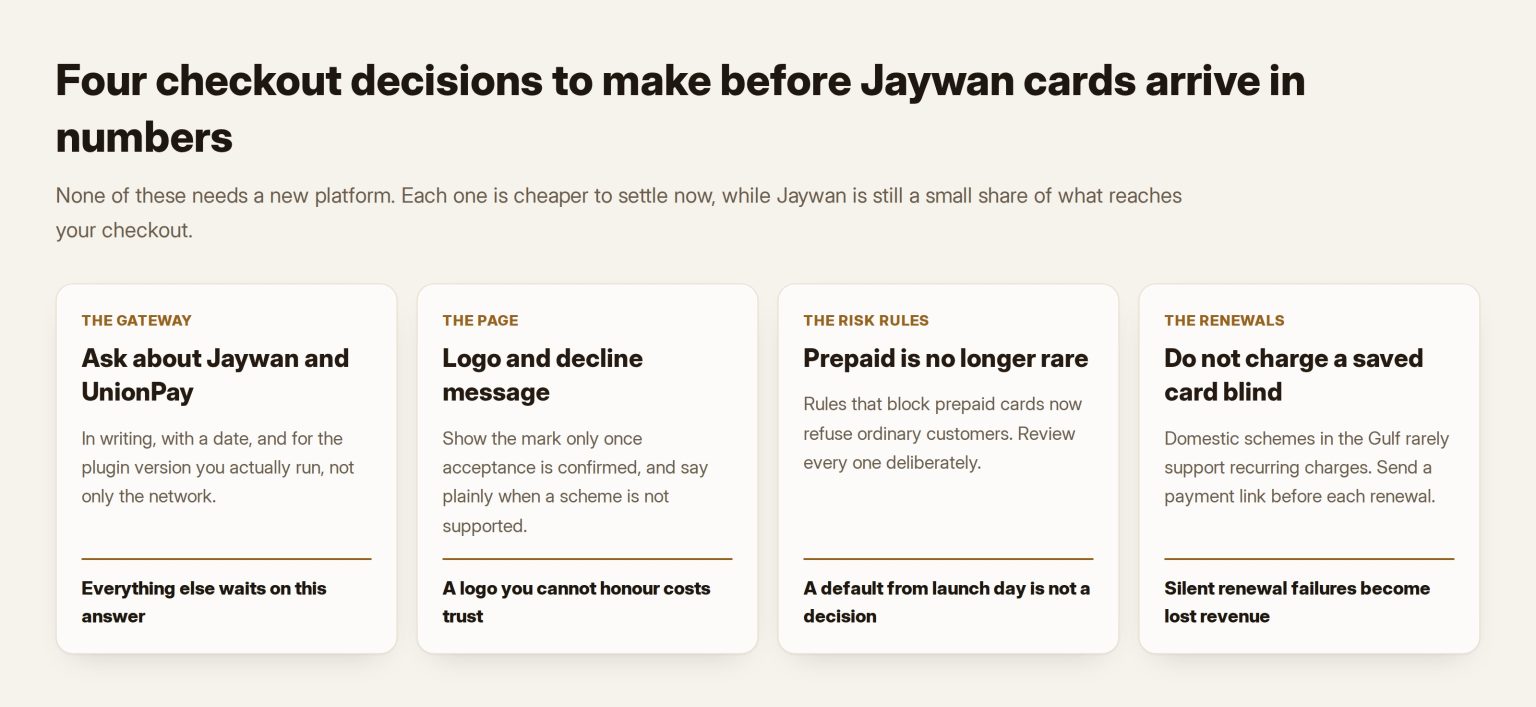
Most UAE checkouts show a row of card logos above the payment form. Customers read it literally. A Jaywan holder who sees Visa, Mastercard and Amex and nothing else will assume the card is not welcome, and some will leave before trying. Add the Jaywan mark the day acceptance is confirmed, and not a day before, because a logo you cannot honour is worse than a missing one.
If your store has an Arabic checkout, show the name there as the scheme writes it in Arabic, not only the Latin logo. A customer checking whether their card is welcome reads the page in the language they chose, and a checkout that is Arabic everywhere except the payment row looks unfinished at the exact moment trust matters most.
The same goes for the error message. A generic “payment failed” teaches the customer nothing. If the gateway can tell you a card was declined because the scheme is unsupported, say so plainly and offer the alternatives on the same screen. That single sentence recovers more sales than any redesign of the button.
Check the rules that quietly block prepaid cards
Many stores have fraud settings they have never read. A common one blocks or challenges prepaid cards, because prepaid cards were once a favourite of fraudsters testing stolen details. That rule made sense when prepaid was rare. With Jaywan prepaid cards going to ordinary customers, it turns a legitimate buyer into a decline, and neither side is told why.
Open the risk settings in your gateway dashboard and in any fraud tool sitting in front of it, find every rule that mentions prepaid, card type or card origin, and decide deliberately what each one should do now. Keep the rule if you sell something that attracts fraud; soften it to an extra check rather than a refusal if you do not. Either way, it should be a decision someone made this year, not a default from the day the store opened.
Domestic schemes in the Gulf have a pattern, so plan for it
The UAE is late to something the rest of the Gulf already has, and the neighbours show what domestic schemes tend to do online. Checkout.com documents each of them. KNET in Kuwait, Benefit in Bahrain and QPay in Qatar all run as redirect or banking-page flows, capture automatically, and support refunds but not authorisations, chargebacks or recurring payments. Benefit processes and settles in Bahraini dinars only.
Jaywan is a card scheme rather than a bank redirect, and its own rules will decide how it behaves. But the pattern is a reasonable planning assumption until your provider documents otherwise: expect capture at checkout rather than at dispatch, expect refunds rather than voids, and do not assume a saved card can be charged again next month.
Subscriptions are where this bites hardest
A store with a subscription, a membership or a repeat delivery depends on charging a saved card without the customer present. Across the Gulf’s domestic networks, that is exactly the feature that is missing. If a meaningful share of your customers start paying with a domestic card, the renewal that silently fails becomes a revenue problem, not an edge case.
Build for it now. Send a payment link before each renewal rather than charging blind, keep a card on file only where the scheme supports it, and make the retry path a message with a button rather than an automatic second attempt that fails the same way.
What to measure in the first month
Declines by card range, not declines in total. A total can hide a small cluster of Jaywan cards failing every time, because they are still a small share. Ask your gateway for a report that shows the scheme or the first digits of each declined card, and read it weekly for the first month after acceptance goes live.
Two more numbers are worth watching: how many customers reach the payment step and leave without trying, and how many support messages mention a card that “does not work”. Both move before revenue does.
Set a threshold before you start, so the numbers lead to an action rather than a discussion. If Jaywan declines run well above the store’s average for two weeks in a row, that is a routing or configuration problem to take back to the gateway, with the report attached.
The order I would do it in
First, ask the gateway the two questions in writing. Second, if Jaywan is supported, test with a real Jaywan card before adding the logo. Third, rewrite the decline message. Fourth, review anything that charges a saved card. Fifth, add the scheme to your weekly decline report. None of this needs a new platform, and most of it is an afternoon once the gateway has answered.
The one step I would not skip is the real-card test. Every fault described here passes a sandbox run, because a sandbox card number is exactly what the integration expects. The only proof that a Jaywan holder can pay is a Jaywan holder paying.
If you are choosing between platforms at the same time, the payment layer should lead that decision, as I argued in Shopify or WooCommerce, decided by how UAE payments actually behave, and getting the merchant account approved comes before any checkout work. For a store that needs the build done, Tothiq builds WooCommerce stores across the GCC with the payment layer set up this way. If it is the decision you want checked, that is part of what I do as a web consultant in the UAE, and on WordPress builds in particular.
Frequently asked questions
Do we have to accept Jaywan?
That is a question for your acquirer and your contract, not for this post. The commercial question is simpler: if your customers start carrying Jaywan cards and your checkout refuses them, you lose the sale whether or not you were obliged to accept it.
Will a Jaywan card work through Visa or Mastercard if our gateway does not support it?
Do not count on it. The co-badged cards Al Etihad Payments describes pair Jaywan with UnionPay, not with Visa or Mastercard. Whether a given card can fall back depends on which brands it carries and what your gateway accepts, so test with real cards.
Is it cheaper for us to accept Jaywan?
Lower payment costs are one of the scheme’s stated aims, and Network International says it charges merchants no additional fees on Jaywan transactions through its gateway. Your actual rate is in your own contract, so ask for it on the same written answer.
Does this change anything for customers paying from other GCC countries?
No. Jaywan covers cards issued in the UAE. Customers in Kuwait, Saudi Arabia, Bahrain, Qatar and Oman bring their own domestic cards, each with its own rules, and a store selling across the Gulf has to plan for each one separately.
How do we test before a customer does?
Ask someone on your team whose bank has issued them a Jaywan debit or prepaid card to place a real order and refund it. A sandbox card number proves the integration exists; a real card from a real bank proves it works.